

♥ Wishlist
Compare 8 Video Surveillance Systems for Canadian Homes & Businesses products in Canada. Reviews, ratings, pros, cons and buying advice updated for October 2026.
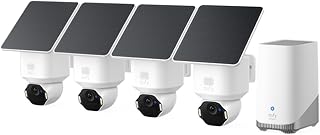


Choosing video surveillance equipment for a Canadian home, apartment, cottage, garage, office, retail space, or small business requires more than comparing camera resolution. A good buying decision depends on where the cameras will be installed, how footage will be stored, whether remote viewing is important, how much night coverage is required, and how the system handles Canadian weather conditions.
The strongest options combine useful image quality, dependable connectivity, practical storage, intelligent detection features, and straightforward installation. Brands such as Reolink, Eufy, TP-Link Tapo, Arlo, Ring, Google Nest, Lorex, Blink, and Wyze offer products across different price and feature categories, but specifications vary considerably between individual models.
This guide focuses on the factors that matter when comparing smart video surveillance deals in Canada during 2026. Product specifications, included accessories, subscription requirements, retailer pricing, and availability can change, so check the latest information before purchasing.
A smart surveillance camera should solve a specific monitoring problem rather than simply provide the largest advertised megapixel number. A camera mounted at a front entrance has different requirements from one covering a long driveway. An indoor camera has different weather and power considerations from a camera installed outside a Canadian home.
Resolution describes the amount of visual detail a camera can capture, but it should not be considered in isolation. A 4K camera can capture considerably more image information than a 1080p model, yet lens quality, lighting, compression, field of view, sensor performance, and installation position all affect the final result.
For a small indoor room, 1080p may be adequate. A 2K camera can provide a useful step up in detail for entrances, hallways, garages, and medium-sized outdoor areas. A 4K model can be particularly attractive where identification detail is important or where a wider scene needs to retain usable detail.
Higher resolution also creates larger video files and may require more storage capacity. Before choosing a high-resolution camera, consider the complete recording system rather than focusing only on the resolution printed on the product box.
Field of view determines how much of the surrounding area appears in the frame. A wide-angle camera can cover more space from one mounting position, while a narrower view can provide more attention to a particular area.
For a front door, position the camera so that visitors approach within a useful viewing zone rather than relying on an extremely wide angle that makes people appear small. For driveways and side passages, consider whether a wide horizontal field of view is more useful than maximum detail at a distant point.
Pan-and-tilt cameras add mechanical movement, allowing the viewing direction to change. This can increase coverage, but a moving camera does not continuously record every direction at the same time. Fixed cameras are often preferable when a specific entry point must remain under constant observation.
Smart detection can make a surveillance system much easier to manage. Basic motion detection may generate alerts whenever a shadow moves, a tree sways, or a vehicle passes. More advanced systems can classify activity and allow users to concentrate on events that matter.
Person detection attempts to distinguish human movement from general motion. This can reduce unnecessary notifications and make event history easier to review.
Vehicle detection can be useful for driveways, parking areas, entrances, and commercial properties. The usefulness depends on camera position and the system's ability to distinguish vehicles within the selected monitoring area.
Animal detection may be valuable around gardens, rural properties, yards, and cottages. It can also help reduce alerts caused by pets when the system supports suitable detection controls.
Some smart cameras provide package-related notifications. This feature can be useful for front entrances, although the camera needs a clear view of the delivery area for reliable event recognition.
There is no universally superior connection method. The right choice depends on installation conditions and the reliability you need.
Wi-Fi cameras are convenient for homes and locations where running network cables would be difficult. Installation can be relatively simple, but performance depends on wireless signal strength and network conditions.
Ethernet-connected cameras can provide a stable network connection. They are often attractive for permanent installations where cabling is practical.
Power over Ethernet allows compatible cameras to receive both power and network connectivity through an Ethernet cable. PoE can create a clean installation for homes, offices, workshops, and larger surveillance systems, although it normally requires compatible networking equipment or a PoE recorder.
Battery-powered cameras offer installation flexibility because they do not require a continuous power cable. The trade-off is the need to monitor battery levels and recharge or replace batteries. Recording settings, weather, temperature, Wi-Fi activity, and event frequency can all affect battery performance.
Outdoor surveillance equipment in Canada can face rain, snow, wind, humidity, freezing temperatures, and large seasonal temperature changes. A camera suitable for indoor use should not automatically be assumed to be appropriate for outdoor installation.
Check the manufacturer's stated operating temperature and weather-resistance specifications before installing a camera outside. The stated environmental rating should match the installation location rather than simply being treated as a general quality indicator.
Winter conditions deserve particular attention. Battery-powered devices can behave differently in cold temperatures, and snow or ice can obstruct the lens. Mounting position also matters because roof runoff, direct exposure to precipitation, and accumulated snow can affect visibility.
Night performance is one of the most important considerations for surveillance because security events can occur after sunset. Infrared night vision uses infrared illumination to produce a view in low-light conditions, while some cameras use visible-light illumination to create colour images.
Do not judge night performance solely by a manufacturer's stated maximum range. Real-world visibility depends on ambient lighting, reflective surfaces, weather, lens quality, mounting height, and the size of the object being viewed.
If the camera will monitor a driveway or entrance at night, consider whether you need facial detail near the camera, general activity awareness across a large area, or identification of objects at a longer distance. These requirements can lead to different camera choices.
Storage is a major part of the total cost and functionality of a smart surveillance system. Many cameras support one or more storage methods.
A compatible microSD card can allow recordings to be stored locally. This can reduce dependence on a cloud subscription, although storage capacity is limited and the card may eventually need replacement.
Cloud storage can make recorded events accessible from multiple locations and can provide convenient event history. However, subscription terms vary between brands and models. Check exactly which features require a paid plan before purchasing.
Network video recorders are commonly used with multiple wired surveillance cameras. They can provide centralized recording and are suitable for buyers who want a more traditional security-camera setup.
Some systems combine local and cloud storage. This can provide additional flexibility, but it is important to understand how recordings are retained and what happens if internet access is interrupted.
Not necessarily. Some cameras provide useful functionality without a recurring subscription, while others place advanced recording, detection, history, or cloud features behind a paid plan.
When comparing deals, calculate the long-term cost rather than looking only at the initial camera price. A less expensive camera can become more costly over several years if important features require a recurring subscription.
Before purchasing, check whether the camera supports continuous recording, event recording, local storage, intelligent detection, and remote access without a subscription. These policies can differ even between products from the same brand.
Internet-connected cameras should be treated as networked computing devices rather than simple recording equipment. Account security, firmware updates, encryption, authentication options, and privacy controls are important considerations.
Indoor cameras are generally designed for controlled environments and may prioritize compact dimensions, two-way audio, privacy shutters, pet monitoring, and easy placement. Outdoor cameras typically require stronger weather protection, suitable operating-temperature specifications, mounting hardware, and better low-light performance.
A camera marketed for indoor use should not be installed outdoors simply because it can connect to Wi-Fi. Likewise, buying an expensive outdoor camera for a small indoor room may provide features you do not actually need.
Video doorbells are designed around an entrance and often combine a camera with a doorbell button, visitor notifications, two-way communication, and package-related features. A conventional security camera can provide a wider range of mounting positions and may be better for monitoring driveways, yards, garages, or side entrances.
For comprehensive coverage, a doorbell camera can complement rather than replace dedicated security cameras. The ideal arrangement depends on the property's layout and the areas that require monitoring.
Pan-and-tilt functionality allows the camera to change its viewing direction. This can be useful for monitoring a larger interior or exterior area from a central position.
Digital zoom enlarges an existing image and does not create additional detail that the sensor did not capture. Optical zoom uses lens movement to change magnification and can be more useful for monitoring distant subjects when available.
For fixed security points such as doors, gates, and narrow entrances, a well-positioned fixed camera can sometimes provide a more predictable view than a motorized camera.
Two-way audio can allow users to communicate through the camera using a smartphone or compatible device. This may be convenient for speaking with visitors, delivery personnel, family members, or workers.
Some models also include a built-in siren. Treat this as an additional feature rather than the primary security mechanism. Check how the siren is controlled and whether it can be activated automatically or manually.
Compatibility with smart-home platforms can influence the convenience of a surveillance system. Depending on the specific model, products from Google Nest, Ring, Arlo, Eufy, TP-Link Tapo, Blink, and other brands may integrate with different ecosystems.
Do not assume that every product from a particular brand supports every smart-home feature. Compatibility can vary by generation, region, subscription level, and device model. Check the current compatibility information for the exact product before purchasing.
The number of cameras should be based on coverage rather than a fixed recommendation. Start by identifying important access points and vulnerable areas.
A small apartment may need only one or two cameras, while a detached home with several access points may benefit from a multi-camera system. Avoid placing cameras so close together that they duplicate the same view while leaving another important area uncovered.
High resolution is useful, but it does not guarantee better surveillance. Lens quality, sensor size, lighting, compression, frame rate, and installation distance all affect image usefulness.
The purchase price is only one part of the cost. Check whether cloud recording requires a recurring subscription and whether local storage requires a separate card or recorder.
A camera installed far from the router may experience unreliable connectivity. Thick walls, metal structures, multiple floors, and interference can reduce wireless performance.
A single wide-angle camera may not provide enough detail for every area. Multiple strategically positioned cameras can create better coverage.
A camera that looks excellent in daylight may not provide the same level of useful detail at night. Always consider the lighting conditions at the installation location.
Battery cameras need charging. Wired cameras require suitable power access. PoE systems require compatible network infrastructure. Confirm the installation requirements before ordering.
When comparing a shortlist of ten cameras or surveillance systems, use the same criteria for every product. This makes differences easier to identify and prevents an attractive headline specification from dominating the decision.
Apartment users may prioritize compact indoor cameras, video doorbells where permitted, easy installation, and strong privacy controls. Wireless cameras can be convenient where permanent cabling is difficult.
Detached homes often benefit from a combination of entrance, driveway, backyard, and side-access coverage. A multi-camera system may provide better coverage than relying on one wide-angle device.
Cottages can present unique connectivity and power challenges. Buyers should consider internet availability, remote access, temperature conditions, and whether the system can continue recording during connectivity interruptions.
Garages and workshops may benefit from cameras with good low-light performance, durable construction, and suitable mounting options. Wired connections can be attractive where a permanent installation is practical.
Small businesses may require multiple cameras, centralized recording, longer retention periods, user permissions, and reliable wired connectivity. A dedicated NVR-based system can be worth considering for these requirements.
Storage requirements depend on the number of cameras, recording resolution, frame rate, compression, and recording schedule. Continuous recording requires considerably more storage than motion-triggered recording.
If long-term footage retention is important, calculate storage requirements before purchasing. A camera system that looks inexpensive may require additional storage hardware to meet your retention goals.
For event-based systems, review how event clips are created, how long they remain accessible, and whether important recordings can be exported. These details can be more important than the headline storage capacity.
Even a high-quality camera needs occasional maintenance. Outdoor lenses can become dirty, and seasonal changes can alter the camera's view.
Brand comparison can help narrow the selection, but individual products should still be evaluated on their own specifications. Reolink is widely associated with both wired and wireless security-camera products, including systems designed around local recording. Eufy offers smart security products with an emphasis on local-storage options across selected product families. Arlo provides connected cameras and related security products, while Ring focuses heavily on connected doorbells and security devices.
Lorex is another established name in surveillance equipment, particularly for camera systems and recording hardware. TP-Link Tapo offers connected home cameras across different price categories. Google Nest products can appeal to users already invested in Google's smart-home ecosystem. Blink provides compact smart security products, while Wyze offers a range of connected cameras and home-monitoring devices.
These brand-level descriptions should not replace model-specific research. Features, subscriptions, storage support, weather ratings, compatibility, and recording capabilities can differ substantially between products within the same brand.
Value means getting the features you actually need at a reasonable total cost. The cheapest camera may lack local storage, advanced detection, suitable weather protection, or the connectivity required for your property.
Likewise, the most expensive model may include capabilities that provide little practical benefit for your installation. A useful approach is to identify your essential requirements first and then compare products that meet them.
For example, a buyer monitoring a front door may prioritize reliable person detection, good night visibility, two-way audio, and convenient event history. A buyer monitoring a large property may instead prioritize PoE connectivity, long-distance coverage, centralized recording, and multiple-camera expansion.
There is no single best camera for every Canadian buyer. The right choice depends on location, budget, image-quality requirements, storage preferences, connectivity, weather exposure, and smart-home compatibility.
They can be worthwhile when additional image detail is important, especially for larger areas or situations where digital cropping may be useful. However, a well-positioned lower-resolution camera can be more practical for some installations.
Some surveillance systems can operate through Ethernet, PoE, cellular connectivity, or local recording. A Wi-Fi camera normally depends on a wireless network for its connected features, so check the exact model's requirements.
Some cameras and surveillance systems support local recording and can continue recording during an internet outage, depending on their design. Remote viewing and cloud-based functions may not work during the outage.
They can be suitable when the specific model is rated for the temperatures at the installation site. Cold weather can affect battery performance, so check the manufacturer's operating specifications before choosing a battery-powered outdoor camera.
No. Some products provide local recording and useful features without a subscription, while others require a paid plan for certain cloud storage or advanced functions. Always check the exact model's service requirements.
Neither option is automatically better. Local storage can reduce recurring costs and provide greater control over recordings, while cloud storage can make remote access and event history convenient. Hybrid systems can offer both approaches.
The appropriate height depends on the property and camera design. The camera should be positioned to discourage easy tampering while retaining a useful angle for identifying activity. Excessive height can reduce useful facial and object detail.
A video doorbell is purpose-built for visitor interaction and entrance monitoring. A traditional security camera can provide greater flexibility in placement. In some homes, using both can create complementary coverage.
There is no single specification that determines overall quality. For most buyers, the combination of image quality, night performance, reliable connectivity, storage, detection accuracy, power requirements, and installation suitability matters more than one headline number.
The best smart video surveillance deal is the one that fits the property and continues to provide useful footage without unnecessary ongoing costs or installation complications. Start by deciding what needs to be monitored, when it needs to be monitored, and how long recordings should be retained.
Then compare resolution, field of view, night vision, detection features, storage, connectivity, power, weather protection, privacy controls, and subscription requirements. For Canadian outdoor installations, pay particular attention to the manufacturer's environmental specifications and seasonal operating conditions.
Before making a final purchase, compare the exact model specifications, current verified customer feedback, included accessories, retailer terms, and today's total cost. A careful comparison is more valuable than choosing a product simply because it has the highest resolution or the lowest advertised price.