

♥ Wishlist
Compare 22 Light Bulbs for Every Room and Lighting Need products in Canada. Reviews, ratings, pros, cons and buying advice updated for October 2026.



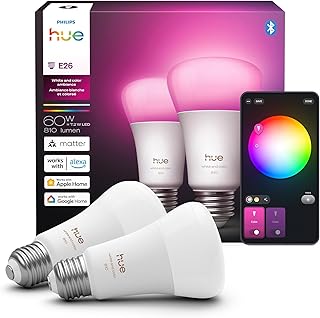


Choosing a smart light bulb is about more than selecting the brightest or cheapest option. The best choice depends on the lighting system in your home, the type of socket you have, the wireless connection you prefer, the features you actually need, and how you expect to control the bulb. Canadian shoppers should also consider voltage compatibility, cold-weather use in suitable fixtures, energy consumption, and whether a product fits an existing smart-home ecosystem.
Smart bulbs from brands such as Philips Hue, Govee, Nanoleaf, Sengled, TP-Link Kasa, TP-Link Tapo, WiZ, LIFX and GE Cync can offer very different combinations of colour control, white-light adjustment, connectivity and automation. Comparing those specifications before buying can prevent compatibility problems and unnecessary spending.
A smart light bulb is an LED lamp with built-in electronics that allow it to be controlled electronically rather than only through a conventional wall switch. Depending on the model, you may be able to adjust brightness, change colour temperature, select colours, create schedules, automate lighting or control the bulb remotely.
Some smart bulbs connect directly to your home Wi-Fi network, while others use Bluetooth, Zigbee, Thread, Matter or another wireless technology. The connection method matters because it affects setup, range, reliability, remote access and compatibility with other smart-home products.
A conventional LED bulb generally performs one primary function: producing light when electrical power is supplied. A smart LED bulb adds connectivity and control features. This can make it useful for routines such as turning lights on before arriving home, dimming bedroom lighting in the evening or automatically switching lights off at a chosen time.
The additional electronics also mean that smart bulbs can cost more than standard LED lamps. If you only need basic illumination and rarely adjust your lighting, a conventional LED bulb may remain the more practical purchase.
Brightness should be compared using lumens rather than relying only on wattage. Watts describe electrical consumption, while lumens indicate the amount of visible light produced.
Remember that a bulb's maximum brightness can vary depending on its colour mode. Some RGB smart bulbs produce a different maximum output when displaying saturated colours compared with white light.
Colour temperature is particularly important if you want a smart bulb for everyday illumination rather than decorative lighting. Warm white light can create a relaxed atmosphere, while cooler white settings can provide a brighter, more neutral appearance.
Look for adjustable white temperature if you want to change the character of a room throughout the day. A bulb marketed primarily for RGB colour effects may not provide the same white-light flexibility as a model designed with dedicated adjustable-white LEDs.
Colour-changing smart bulbs can display different colours through a smartphone application or compatible voice assistant. They are useful for entertainment areas, gaming rooms, parties, accent lighting and decorative installations.
However, RGB capability should not automatically make a bulb the best choice for general room lighting. If accurate, comfortable white illumination is your priority, compare the bulb's white-light specifications separately from its colour features.
Many smart bulbs offer software-controlled dimming without requiring a traditional physical dimmer switch. This allows brightness to be adjusted through an app, voice command, automation or compatible smart-home controller.
Do not assume that every smart bulb is compatible with a wall-mounted dimmer. Traditional mains dimmers can interfere with smart bulbs because the bulb generally needs continuous power for its electronics and wireless connection. Always check the manufacturer's compatibility instructions before installing a smart bulb on a circuit controlled by a conventional dimmer.
Before comparing features, identify the physical socket and bulb shape required by your fixture. A sophisticated smart bulb is of little use if it does not physically fit the lamp.
Many household fixtures use familiar screw-type bases, but the exact base should be confirmed from the existing bulb, fixture documentation or socket markings. Common household formats include A19-style bulbs with E26 bases, although other shapes and bases are also available.
Physical dimensions can vary significantly even when two bulbs use the same base. This is especially important for recessed fixtures, compact lamps and decorative fittings.
Connectivity is one of the biggest differences between smart lighting products. Understanding the main technologies makes it easier to compare products that otherwise appear similar.
Wi-Fi bulbs can often connect directly to a home router without requiring a separate proprietary lighting hub. This can simplify initial installation and reduce the number of devices required.
The trade-off is that every connected bulb becomes another device communicating with the home network. Wi-Fi performance can also depend on router placement, network congestion and wireless coverage.
Bluetooth can be convenient for direct local control from a compatible smartphone or device. It can be attractive for smaller installations where advanced remote control is not essential.
However, Bluetooth range and remote-access capabilities vary between products. Check the manufacturer's specifications rather than assuming every Bluetooth bulb supports the same functions.
Zigbee is a low-power wireless technology commonly used in smart-home equipment. Some lighting systems use a hub or bridge to connect Zigbee bulbs with a home network and smart-home platform.
A hub-based system can make sense for larger lighting installations because the architecture is designed around dedicated smart-home communication rather than putting every bulb directly on Wi-Fi.
Thread is a low-power mesh networking technology increasingly relevant to modern smart-home devices. It is designed to support reliable communication between compatible devices and can be particularly interesting for shoppers building a broader smart-home system.
Matter is an application-layer smart-home standard intended to improve interoperability between compatible devices and ecosystems. A Matter-compatible bulb may be able to work with multiple supported smart-home platforms, but compatibility still depends on the exact device, controller and features supported.
Do not treat the word “Matter” as a guarantee that every feature works identically across every platform. Before buying, check which functions are supported through the smart-home ecosystem you intend to use.
If you already use a voice assistant or smart-home platform, compatibility should be one of the first buying criteria. A bulb may work perfectly through its manufacturer's app but offer fewer controls through a third-party platform.
Depending on the product, smart lighting may integrate with platforms such as Amazon Alexa, Google Home or Apple Home. Some products also support Matter, allowing compatible installations to bridge different smart-home ecosystems.
Apple Home users should verify whether a specific bulb supports Apple Home directly, through Matter, or through another supported integration. Compatibility can vary by generation and connection method.
Google Home users should check whether the bulb can be added directly to their existing setup and whether the functions they want, such as colour control, brightness adjustment and automation, are supported.
Alexa users should verify the required skill, integration or Matter setup where applicable. Also check whether voice control provides the same functionality as the manufacturer's app.
There is no single smart-bulb brand that is automatically best for every household. Different manufacturers emphasise different strengths.
Brand recognition alone should not determine the purchase. Compare the individual bulb's specifications, connectivity, compatibility and dimensions because features can differ substantially within the same product family.
A hub-free smart bulb can be appealing because installation may require fewer components. You generally install the bulb, connect it using the manufacturer's setup process and then add it to the relevant smart-home platform if supported.
This approach can be particularly attractive for a small apartment, bedroom or single-room installation.
A hub can be useful when you want a larger lighting network with multiple bulbs, switches and accessories. The hub may provide a central connection between the lighting products and your home network.
The downside is additional hardware and another component that needs to remain powered. A hub-based system can nevertheless be worthwhile if you intend to expand your lighting setup significantly.
Buying a complete set of smart bulbs for every fixture is not always the most economical approach. Start by identifying which lights genuinely benefit from automation or remote control.
A bedroom bulb should prioritise comfortable white-light adjustment, smooth dimming and reliable scheduling. Colour effects can be useful, but they are usually secondary to everyday lighting quality.
The living room benefits from flexible brightness and colour-temperature settings. If the room is also used for entertainment, full-colour effects may be valuable.
Kitchen lighting generally benefits from strong, clear white illumination. Compare brightness, colour temperature and fixture compatibility carefully rather than selecting a bulb primarily for RGB effects.
For a workspace, prioritise adjustable brightness and suitable white-light settings. Smart scheduling can also help automate lighting during regular working hours.
Gamers may prefer RGB bulbs with scenes, colour effects and synchronisation features where supported. App quality and compatibility with other lighting products can become more important than basic bulb specifications.
Automation can be especially useful in areas that are frequently passed through but do not need to remain illuminated continuously. Scheduling or motion-based smart-home routines may reduce unnecessary operation when compatible equipment is available.
Smart bulbs are generally based on LED technology, which can provide efficient illumination compared with older lighting technologies. However, energy consumption depends on the bulb's electrical rating, brightness, operating hours and settings.
A smart bulb also consumes a small amount of electricity while it remains connected and ready to respond to commands. The exact standby consumption varies by model, so shoppers concerned about energy use should compare manufacturer specifications rather than assuming every connected bulb has identical standby requirements.
The purchase price is only one part of the overall cost. Consider the number of bulbs required, expected operating hours, additional hubs or accessories, and whether you actually intend to use the smart features.
A more expensive bulb may make sense if you need a particular ecosystem, advanced automation or a specific lighting capability. Conversely, paying extra for features that will never be used may not provide good value.
Colour-changing capability does not necessarily indicate superior everyday illumination. If the bulb will be used for reading, cooking, working or general room lighting, investigate its white-light performance separately.
For shoppers who care about how furniture, walls and décor appear under artificial light, colour-rendering performance can also be an important consideration. Where the manufacturer publishes colour-rendering information, compare it with the requirements of the room rather than focusing exclusively on RGB effects.
Canadian homes can have a wide range of lighting arrangements, from detached houses and townhomes to apartments and condominiums. The best smart bulb depends more on the specific fixture and home network than on the building type alone.
For exterior or semi-exterior applications, pay particular attention to the fixture rating and environmental limitations. A normal indoor smart bulb should not automatically be assumed suitable for outdoor use, damp locations or extreme temperatures.
Temperature can affect electronic products and LED lighting performance. If a smart bulb is being considered for a garage, porch, unheated space or another location exposed to cold conditions, check the manufacturer's specified operating environment.
Do not assume that an indoor-rated smart bulb is suitable for every Canadian outdoor application. The fixture itself may also have requirements relating to moisture, temperature and enclosure.
The most basic mistake is selecting a bulb that cannot physically fit the fixture. Check the socket before comparing smart features.
Some fixtures are enclosed, tightly ventilated or otherwise unsuitable for particular bulb designs. Check the manufacturer's instructions and fixture requirements.
A bulb can have excellent specifications but still be inconvenient if it does not integrate properly with your existing smart-home setup.
Local functionality differs between products. Some bulbs may retain certain controls when internet connectivity is unavailable, while others rely more heavily on cloud services. Review the manufacturer's documentation if local control is important to you.
Smart bulbs generally need continuous electrical power for their wireless electronics. A conventional dimmer can create compatibility problems. Verify the electrical setup before installation.
The lowest purchase price is not necessarily the best deal. Compare brightness, colour range, connectivity, ecosystem compatibility, app features, automation support and the number of accessories required.
The smartphone application can have a major impact on the ownership experience. Two bulbs with similar hardware can feel very different if their software provides different automation and control options.
Automation is one of the strongest reasons to purchase smart lighting. Instead of manually changing every bulb, you can configure supported products to respond to schedules, routines or other smart-home events.
The exact automation capabilities depend on the bulb, application and smart-home platform. Check the complete compatibility list before assuming a particular routine is available.
Voice control can be convenient when your hands are occupied or when the wall switch is not easily accessible. Commands may include changing brightness, turning lights on or off, or selecting supported colours.
For reliable voice control, make sure the bulb is compatible with the voice platform you use and that the required account linking or controller is supported. Some advanced app functions may not be available through voice commands.
Connected lighting products are part of your home network, so privacy and security should not be ignored. Before purchasing, consider how the manufacturer handles account access, firmware updates and connected-device data.
Security practices and available controls vary between manufacturers. The manufacturer's current documentation should be treated as the authoritative source for a particular model.
When comparing smart light bulb deals, calculate value based on the complete package rather than the headline price. A discounted bulb may require a hub or accessory that changes the overall cost.
Customer reviews can provide useful information about installation, app usability and long-term ownership, but they should not be treated as a substitute for technical specifications.
Look for recurring patterns rather than relying on one extremely positive or negative comment. Reviews can be especially useful for identifying practical issues such as difficult setup, connection problems, unexpected dimensions or confusing controls.
It is also useful to separate comments about the product itself from complaints caused by incompatible routers, incorrect installation or unsupported smart-home configurations.
A specification sheet can look complicated, but the most important details can be narrowed down quickly.
A smart bulb is not always the best way to make a light smart. A smart switch can control the electrical circuit itself and may be more appropriate when you want ordinary bulbs to remain controllable from wall switches.
Smart bulbs are particularly useful when you want individual bulb-level control, colour changing or advanced lighting effects. Smart switches can be more practical when multiple conventional fixtures are controlled together.
The choice also depends on the home's electrical wiring and the type of switch installation. Electrical work should be approached according to applicable Canadian requirements and, where necessary, handled by a qualified professional.
Confirm that the bulb is powered, the correct setup procedure is being followed and the phone is connected to the appropriate network during installation. Some products have specific requirements for wireless bands or setup modes.
Check wireless signal strength, router placement and whether other smart devices experience similar connectivity issues. Firmware updates may also address known problems where supported.
This is usually a basic smart-bulb behaviour rather than a defect. If power is removed at the wall switch, the bulb cannot receive wireless commands. Smart bulbs generally work best when the physical switch remains in the powered position.
Colour output can vary depending on the bulb's hardware, software settings and surrounding lighting. Check whether the selected colour mode is supported and whether a firmware or app update is available.
Follow the manufacturer's reset and pairing instructions rather than repeatedly attempting random setup procedures. A factory reset may be required when a bulb has previously been connected to another account or network.
Smart lighting is not automatically better than conventional lighting. A standard LED bulb may be the better option when you need simple illumination, have no interest in automation, want to minimise connected devices or are fitting a large number of lights where smart control provides little practical benefit.
Likewise, if the fixture is difficult to access and will rarely be controlled, paying for advanced app and colour features may not provide meaningful value.
A premium model can make sense for shoppers who want a mature lighting ecosystem, extensive automation, sophisticated colour control, broader accessory compatibility or integration with a larger smart-home setup.
Premium lighting is particularly compelling when several bulbs need to work together as scenes, rooms or whole-home routines.
Budget models can be suitable for shoppers who want basic remote control, scheduling, dimming or voice integration without investing heavily in an entire lighting ecosystem.
Before choosing the cheapest option, confirm the bulb's wireless requirements, smart-home compatibility and app functionality. A small difference in purchase price may be insignificant compared with the inconvenience of replacing incompatible bulbs later.
There is no universal best smart light bulb for every Canadian home. The right option depends on brightness requirements, bulb base, colour features, connectivity, smart-home compatibility, automation needs and budget. Philips Hue, Govee, Nanoleaf, Sengled, TP-Link Kasa, TP-Link Tapo, WiZ, LIFX and GE Cync are among the brands worth comparing, but individual models should be evaluated on their published specifications.
Smart bulbs can be worthwhile if you value remote control, scheduling, dimming, colour adjustment or smart-home automation. If you only need simple on-and-off illumination, a conventional LED bulb may offer better value.
Smart bulbs use electricity while operating, and connected models may also consume a small amount of standby power while waiting for commands. Exact consumption varies by product, so compare the manufacturer's published electrical specifications when energy use is a priority.
It depends on the bulb and its connectivity system. Some products support Bluetooth or local control, while others depend more heavily on Wi-Fi or cloud services. Check the specific model's documentation to determine what functions remain available without an internet connection.
Not always. Many Wi-Fi smart bulbs connect directly to a router, while some Zigbee-based or ecosystem-focused lighting systems use a hub or bridge. Thread and Matter configurations can also involve a compatible controller depending on the setup.
Yes, but the physical switch generally needs to remain on for the smart bulb to remain powered and connected. Turning the switch off cuts power and prevents the bulb from receiving smart commands.
Compatibility varies, and a conventional mains dimmer should not be assumed to work with a smart bulb. Check the manufacturer's instructions before connecting a smart bulb to a dimming circuit.
Only use a smart bulb in an enclosed fixture when the manufacturer specifically indicates that the model is suitable for that application. Heat management and fixture compatibility can affect electronic products.
Only models and fixtures specifically rated for the intended outdoor environment should be considered. Canadian weather can involve substantial temperature variation, so check the manufacturer's operating and environmental specifications carefully.
Matter is a smart-home interoperability standard designed to help compatible devices work across supported ecosystems. Matter compatibility can simplify ecosystem choices, but shoppers should still verify the exact features supported by the bulb and their controller.
Philips Hue may be attractive for shoppers who want an established lighting ecosystem and broad product range. However, another brand may be a better fit if your priority is lower cost, a particular connectivity method, specific app features or a different smart-home platform.
They can be, but RGB functionality does not automatically determine white-light quality. If the bulb will primarily illuminate a room, compare its white-light output, colour temperature and colour-rendering specifications in addition to its colour effects.
The appropriate brightness depends on the room, fixture and number of bulbs. Compare lumen output rather than wattage alone, and remember that a single bulb may need a higher output than several bulbs distributed throughout the same room.
Smart LED products are designed for long service compared with older lighting technologies, but actual lifespan depends on the specific product, operating conditions, usage and electronics. Use the manufacturer's published lifespan information for model-specific expectations.
A multipack can be convenient when you need several identical bulbs, particularly when creating a coordinated room or lighting system. Compare the per-bulb cost and make sure all bulbs have the specifications and connectivity features you need.
The best smart light bulb deal is not necessarily the product with the biggest discount or the longest feature list. Start with compatibility: identify the socket, fixture restrictions, brightness requirement and smart-home ecosystem. Then compare connectivity, white-light quality, colour capability, dimming, automation, dimensions and total ownership cost.
For a simple installation, a direct Wi-Fi or Bluetooth model may be convenient. For a larger connected lighting system, a hub-based ecosystem or a compatible Thread and Matter setup may be worth considering. Shoppers interested primarily in decorative lighting should place greater emphasis on colour effects and scenes, while those buying bulbs for kitchens, offices or bedrooms should give greater weight to brightness and adjustable white light.
Before purchasing, compare the latest specifications and customer feedback for the exact model rather than relying only on the brand name. Product generations can differ in connectivity, compatibility and features. Checking the complete specification sheet is one of the simplest ways to avoid buying a smart bulb that does not suit your fixture or smart-home setup.