

♥ Wishlist
Compare 17 Makita Line Laser Level for Precise Alignment and Layout products in Canada. Reviews, ratings, pros, cons and buying advice updated for October 2026.


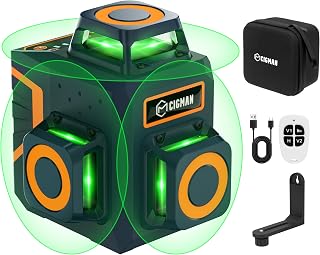


Choosing a Makita line laser level is less about selecting the most expensive model and more about matching the laser configuration, accuracy, visibility, power system and working environment to the job. Makita's Canadian range includes compact cross-line models, multi-line lasers and 360-degree green laser systems, giving tradespeople and serious DIY users several ways to approach levelling, alignment, plumbing and layout work.
For Canadian buyers, it is particularly important to distinguish between a tool-only package and a kit that includes a battery and charger. Some Makita laser levels use the 12Vmax CXT platform, while accessories and power options can vary by model. Always check the exact model number, included equipment and current Canadian specification before purchasing.
A line laser projects one or more visible reference lines onto walls, floors, ceilings or other surfaces. Instead of repeatedly measuring from a spirit level or transferring measurements manually, you can use the projected line as a visual reference while positioning fixtures, framing components, cabinets, electrical points, pipes and other building elements.
The useful features differ considerably between models. A simple cross-line laser can be an excellent choice for basic horizontal and vertical alignment, while a 360-degree multi-line laser is better suited to jobs where several walls or surfaces must share the same reference.
One of the most common buying decisions is whether to choose a green or red laser. The difference is primarily about visibility, not simply accuracy.
Green laser light can be easier for the human eye to see, particularly in bright indoor environments. This can make green models attractive for construction, framing, renovation and layout work where the projected line must remain easy to identify.
Red lasers can still be highly practical for general indoor alignment, particularly when the working distance and lighting conditions are favourable. The right choice depends on where and how you work rather than assuming that one colour is automatically superior for every application.
Before comparing individual models, understand what the projected lines actually do. A laser advertised as a cross-line model is fundamentally different from a 360-degree multi-line laser, even if both are described as line lasers.
A cross-line laser normally projects a horizontal line and a vertical line. The intersection provides a convenient reference for tasks such as levelling cabinets, aligning wall fixtures and establishing vertical positioning.
Cross-line systems are often a sensible choice when the work is concentrated around one wall or one installation area. They can provide the essential horizontal and vertical references without paying for line coverage that may never be used.
Some Makita models add point projections to the horizontal and vertical lines. Points can be useful for transferring positions between surfaces or establishing references above, below or to the sides of the laser.
The Makita SK106GDZ, for example, combines a green cross-line laser with four points and provides selectable beam combinations. Makita Canada specifies a self-levelling range of approximately plus or minus 4 degrees and an accuracy specification of plus or minus 3 mm at 10 m for this model. :contentReference[oaicite:0]{index=0}
A multi-line laser projects several vertical and horizontal lines. This increases the number of usable references and can reduce the need to reposition the instrument during complex layout work.
The Makita SK40GD is a 12Vmax CXT green laser with four vertical lines and one horizontal line. Makita lists two brightness modes and support for either a 12Vmax CXT lithium-ion battery or an optional AA-battery adapter. :contentReference[oaicite:1]{index=1}
A 360-degree laser is designed to project lines around the working area rather than concentrating coverage in one direction. This can be especially useful when setting references around a room.
The Makita SK700GD is a 12Vmax CXT green multi-line laser with four vertical and four horizontal lines. Its selectable modes include combinations of vertical and horizontal lines, while its integrated rotary base and fine-adjustment system are designed to help position the projected lines accurately. Makita Canada specifies an accuracy of plus or minus 2 mm at 10 m. :contentReference[oaicite:2]{index=2}
The SK700GD is aimed at users who need substantially more line coverage than a conventional cross-line laser. It can project three full 360-degree lines, according to Makita's Canadian product information, and provides six selectable laser-line configurations. :contentReference[oaicite:3]{index=3}
Its rotary base is particularly relevant when precision positioning is important. The eccentric rotation mechanism allows the laser body to rotate without changing the defined plumb point, while a fine-adjustment dial allows controlled positioning of the laser lines. :contentReference[oaicite:4]{index=4}
This type of design can be valuable for interior construction, framing, partition layout, ceiling work, cabinetry and other applications where moving the laser repeatedly would slow down the job.
Makita laser levels can be offered as tool-only products or as complete kits. This distinction can substantially affect the overall purchase value.
A tool-only laser can make sense if you already own compatible batteries and charging equipment. For example, Makita Canada identifies the SK700GD as a 12Vmax CXT tool-only model, with batteries and charger sold separately. :contentReference[oaicite:5]{index=5}
Before choosing this format, confirm that your existing battery is compatible with the exact model. Do not assume that every Makita cordless product uses the same battery platform.
A kit may be more convenient for a new user because it can include the laser, battery and charger together. Makita Canada lists the SK700GDWAJ as a green multi-line kit supplied with a 2.0Ah CXT battery and standard charger, along with mounting and carrying accessories. :contentReference[oaicite:6]{index=6}
When comparing prices, therefore, avoid comparing a tool-only model directly with a complete kit without accounting for the cost of the missing battery and charger.
Accuracy is one of the most important specifications on a professional laser level, but it is easy to misunderstand. A statement such as plus or minus 2 mm at 10 m should not be interpreted as the laser being guaranteed to place every line within exactly 2 mm under every conceivable condition.
It is a manufacturer specification associated with a defined measurement distance and operating conditions. Temperature, handling, setup, surface conditions and calibration can all affect practical results.
For comparison purposes, use the same distance when evaluating competing models. A laser specified at 2 mm per 10 m should be compared carefully with another model whose accuracy is quoted at a different distance.
Small alignment errors can become more noticeable as the working distance increases. A laser used for a short cabinet installation has different requirements from one used to establish references across a large room or construction area.
For precision-sensitive work, compare the manufacturer's stated accuracy, self-levelling range and operating procedure rather than relying solely on product ratings or marketing descriptions.
Self-levelling allows the laser mechanism to compensate for a limited amount of instrument tilt. This makes setup much faster than manually adjusting a bubble level until the tool is perfectly positioned.
However, self-levelling does not mean the laser can compensate for unlimited movement. If the instrument is outside its specified levelling range, the system may indicate that it cannot establish a level reference.
Makita's SK700GD, for example, specifies a vertical line indication range of plus or minus 4 degrees. :contentReference[oaicite:7]{index=7}
A levelling lock has two important purposes. It can disable the self-levelling function when you intentionally need a sloped reference, and it can help protect the levelling mechanism during transport.
This feature is therefore useful beyond simple levelling. Renovation, stair layout, roof-related work and other applications can require deliberate angled references.
Several Makita laser models in the Canadian range carry an IP54 rating. The rating is useful information, but it should not be interpreted as making the tool waterproof.
IP54 indicates protection against limited dust ingress and water splashing from specified directions. It is not a licence to submerge the laser, expose it to heavy uncontrolled water or ignore the manufacturer's operating instructions.
For Canadian construction and renovation environments, environmental protection can still be a valuable consideration because dust, debris and occasional moisture are common jobsite conditions.
Makita also uses its eXtreme Protection Technology, commonly abbreviated as XPT, on selected laser products. Makita describes the system as providing protection against dust, debris and liquids for performance in demanding conditions. :contentReference[oaicite:8]{index=8}
When comparing models, look at the actual protection specification for the specific product instead of assuming that every Makita tool has identical environmental protection.
Brightness adjustment is useful because maximum brightness is not necessarily ideal for every situation. Some models provide Eco, Normal and Bright settings, while others provide fewer options.
A brighter setting can help when the working environment makes the projected line difficult to see. A lower setting can be preferable when excessive brightness makes the line harder to work with at close range or when conserving battery power is a priority.
The SK700GD, for example, provides three brightness selections: Eco, Normal and Bright. :contentReference[oaicite:9]{index=9}
Battery runtime is more than a convenience issue for professional users. If a laser is used throughout a full working day, having a compatible spare battery can prevent interruptions.
When comparing cordless Makita laser levels, consider:
The SK700GD can operate from a 12Vmax CXT lithium-ion battery and can also use eight AA batteries with the optional ADP09 adapter. :contentReference[oaicite:10]{index=10}
Home renovation does not necessarily require the most advanced multi-line laser. The right model depends on the projects you actually perform.
For hanging cabinets, aligning shelving, installing wall fixtures and establishing basic horizontal and vertical references, a cross-line laser may provide sufficient functionality.
For room renovations involving multiple walls, ceilings, flooring references or complex layout work, a multi-line or 360-degree model can reduce repositioning and provide more continuous references.
Framing can benefit from clear vertical and horizontal references, particularly when establishing walls, openings and alignment points. A multi-line configuration becomes increasingly useful when multiple planes must be referenced at the same time.
For more complex framing layouts, consider the number and orientation of vertical lines, whether the horizontal line provides adequate coverage and whether the tool can be positioned precisely without repeatedly moving the base.
Cabinet installation often demands a reliable horizontal reference because even a small visible alignment difference can be noticeable across a run of cabinets.
A cross-line laser can provide the fundamental reference required for cabinet height and vertical alignment. A compact model can also be preferable when working in smaller rooms where a large multi-line system offers little additional benefit.
Before buying, check mounting options carefully. A good laser that cannot be conveniently positioned at cabinet height may be less useful than a simpler model with a mounting arrangement that suits the installation.
Laser levels can simplify layout for electrical and plumbing work by providing consistent horizontal, vertical and sometimes point references. This can help installers position multiple components relative to a common reference.
Point projection becomes particularly interesting when transferring positions between surfaces. Multi-line systems can also be useful when several planes need to remain aligned.
A laser level should still be treated as a layout aid rather than a substitute for the relevant building codes, installation requirements, manufacturer instructions or professional judgement.
Many professional line lasers use Class 2 laser products. Makita specifications for models such as the SK700GD identify the laser as Class 2 with an output of 2 mW or less. :contentReference[oaicite:11]{index=11}
Never deliberately stare into a laser beam or aim the beam toward another person's eyes. Follow the safety instructions supplied with the exact laser level and observe the manufacturer's warnings during setup, operation, transportation and storage.
Green is often easier to see, but visibility does not tell you everything about a laser level. Accuracy, line coverage, mounting, power and intended application can be more important.
A sophisticated multi-line laser can be extremely useful for complex work, but a basic cross-line model may be more sensible for occasional home projects.
A lower initial price can reflect a tool-only configuration. Always establish whether the listing includes a battery, charger, adapter, case and mounting accessories.
Always compare accuracy specifications on an equivalent basis. A measurement stated at 10 m cannot automatically be treated as equivalent to a specification stated at another distance.
IP54 protection should not be treated as waterproofing. Follow the operating and care instructions for the specific model.
Laser visibility is irrelevant if the instrument cannot be positioned where the reference line is needed. Consider tripod compatibility, brackets, magnetic mounting and fine adjustment before purchasing.
Makita model numbers can distinguish different laser colours, configurations and kit contents. Check the complete model designation rather than relying only on a product title.
A practical comparison should focus on the following specifications:
These model numbers are closely related, but buyers should not treat them as interchangeable listings. Makita Canada identifies the SK700GD as a tool-only green multi-line laser, while the SK700GDWAJ is a kit that includes a 2.0Ah CXT battery and charger. :contentReference[oaicite:12]{index=12}
The core laser specifications are similar, including four vertical lines, four horizontal lines and plus or minus 2 mm accuracy at 10 m. The key purchasing difference is the supplied power equipment and package contents. :contentReference[oaicite:13]{index=13}
If you already own compatible CXT batteries, the tool-only configuration may be the more logical comparison. If you are starting from scratch, compare the complete kit cost against the cost of purchasing the necessary battery and charger separately.
The SK40GD and SK700GD serve different layout requirements. The SK40GD provides four vertical lines and one horizontal line, whereas the SK700GD is designed around four vertical and four horizontal lines with 360-degree coverage. :contentReference[oaicite:14]{index=14}
This makes the SK40GD potentially attractive for users who need several vertical references without requiring the full coverage of a 360-degree system. The SK700GD is better suited to applications where continuous line coverage around the work area can save repositioning time.
The SK106GDZ combines a green cross-line configuration with four points. It offers selectable combinations of horizontal, vertical and point projections, making it more versatile than a basic two-line cross laser while remaining focused on a different type of layout work than a full 360-degree multi-line system. :contentReference[oaicite:15]{index=15}
Its stated accuracy is plus or minus 3 mm at 10 m, while the SK700GD is specified at plus or minus 2 mm at 10 m. :contentReference[oaicite:16]{index=16}
That does not automatically make the SK700GD the better purchase. The more appropriate model depends on whether you need point projection, full 360-degree coverage, additional line modes or a particular mounting and power arrangement.
Occasional users may not benefit from paying for features they will rarely use. If your primary requirements are hanging shelves, aligning pictures, installing a small cabinet or establishing a simple horizontal reference, a basic cross-line laser may be enough.
Advanced models become easier to justify when multiple lines, point projection, 360-degree coverage, fine adjustment or frequent jobsite use will save time repeatedly.
Precision equipment benefits from careful handling. Keep the laser windows clean and free from dust, fingerprints and construction debris. Use appropriate cleaning methods recommended by the manufacturer rather than abrasive materials that could damage optical surfaces.
Store the tool in its supplied or appropriate protective case when possible. Avoid leaving it loose in a tool box where impacts from heavier equipment can affect the instrument.
Battery-powered models should also be stored and charged according to Makita's battery guidance. If the tool has been dropped or subjected to a significant impact, do not assume that it remains perfectly calibrated simply because the laser still turns on.
A laser level can continue projecting a visible line even if its accuracy has changed. For precision applications, periodic accuracy checks are therefore more meaningful than simply confirming that the beam appears straight.
A suitable check should follow the manufacturer's recommended procedure and tolerances. If the result falls outside the specified accuracy, professional inspection or calibration may be appropriate.
Do not attempt an unfamiliar calibration adjustment simply because an online guide suggests it. Incorrect adjustment can make an instrument less accurate.
The laser itself is only one part of a practical layout system. Depending on the application, useful accessories can include:
Check the exact contents of each Canadian listing before assuming an accessory is included. Makita's official specifications show that package contents can differ between tool-only products and kits. :contentReference[oaicite:17]{index=17}
Makita is not the only established manufacturer in the professional measurement-tool market. Buyers may also encounter Bosch, DEWALT, Milwaukee, STANLEY and other brands when comparing line lasers in Canada.
The most useful comparison is not simply brand against brand. Compare each model's accuracy, beam configuration, visibility, self-levelling range, battery ecosystem, mounting system, protection rating and package contents.
A professional user who already owns Makita CXT batteries may reasonably value platform compatibility. Another buyer with an established Bosch, DEWALT or Milwaukee ecosystem may find a competing platform more convenient. The best purchase is the one that fits the existing workflow and technical requirements.
Online product listings can vary in how much technical information they provide. Before buying, verify the following details from the current listing and manufacturer's documentation:
Product specifications can change, and Makita Canada notes that specifications may be changed without notice. For that reason, use the manufacturer's current documentation and the exact retailer listing when making the final purchasing decision. :contentReference[oaicite:18]{index=18}
The cheapest listed price is not always the best deal. A better approach is to calculate the complete setup required for your work.
There is no single best model for every Canadian buyer. A cross-line laser can be suitable for basic levelling and alignment, while a 360-degree multi-line model can be more appropriate for complex construction and room-layout work. Choose according to line coverage, accuracy, power requirements and mounting needs.
Green laser lines are generally easier to see in bright conditions, but colour alone does not determine which laser is best. Compare the complete specification and your working environment.
Yes. Makita Canada describes the SK700GD as a 12Vmax CXT green multi-line laser capable of projecting three full 360-degree lines, with four vertical and four horizontal lines available through its line configurations. :contentReference[oaicite:19]{index=19}
Makita Canada specifies the SK700GD at plus or minus 2 mm at 10 m. Always consult the current manufacturer documentation for the complete operating and accuracy information. :contentReference[oaicite:20]{index=20}
The standard SK700GD is listed as a tool-only model, with batteries and charger sold separately. The SK700GDWAJ is a kit that includes a 2.0Ah CXT battery and charger. :contentReference[oaicite:21]{index=21}
The SK700GD is the green-laser version, while the SK700D is the red-laser version. Makita Canada lists the two as separate 12Vmax CXT 360-degree multi-line laser models. :contentReference[oaicite:22]{index=22}
Visibility outdoors depends heavily on ambient light, distance and the surface receiving the beam. Green lasers can offer better visibility in bright conditions, but buyers should check the exact model's operating guidance and use suitable detection or target accessories when necessary.
Models equipped with a levelling lock can disable self-levelling for applications requiring an intentionally sloped reference. Follow the specific model's instructions before using this function.
IP54 can provide useful protection against dust ingress and splashing water, but it does not mean the laser is waterproof. Construction users should still protect the tool from unnecessary moisture, impact and contamination.
Not necessarily, but a stable mounting system can make precise positioning much easier. The right mounting method depends on whether you are working from the floor, wall, ceiling or another fixed reference.
They can be. A tool-only model may provide better overall value for someone who already owns compatible CXT batteries and a charger. For a new user, a complete kit may be more convenient.
Before choosing a Makita line laser level deal in Canada, work through this checklist:
The best Makita line laser level is the one that gives you the right reference coverage without forcing you to pay for capabilities you do not need. A compact cross-line model can be highly practical for straightforward alignment, while models with point projection offer additional layout flexibility. For professional users handling complex interior layouts, the SK40GD and SK700GD demonstrate how additional vertical and horizontal coverage can change the workflow. :contentReference[oaicite:23]{index=23}
The SK700GD is particularly compelling for buyers who need 360-degree green line coverage, fine positioning and multiple selectable line configurations. The SK700GDWAJ can be a more convenient starting point when a battery and charger are also required. :contentReference[oaicite:24]{index=24}
For the smartest purchase, do not judge a Makita laser level solely by its advertised deal price. Compare the exact model, accuracy, laser configuration, visibility, self-levelling capability, battery requirements, protection rating, mounting options and package contents. Then check current Canadian retailer pricing and verified customer feedback before making the final decision.