
Best Printers & Scanners for Home, Office & Everyday Printing Products online Canada
Explore our real-time updated product directory index curated for performance, verified star metrics, and historical consumer trust rankings.
Verified Deal Selections
26 Items Indexed
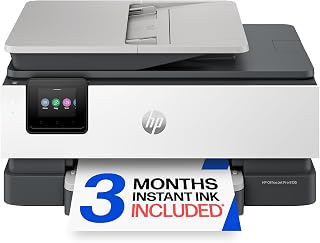

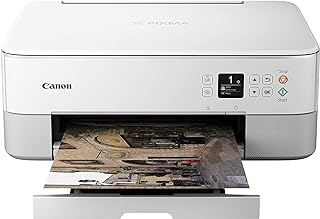
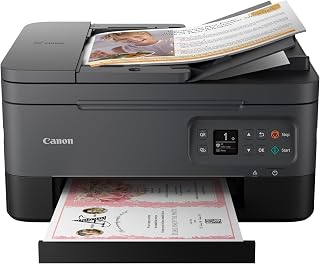


Shop Printers & Scanners for Everyday Needs
Printers and scanners remain useful tools for homes, offices, classrooms, small businesses and anyone who regularly works with physical documents. From printing forms and school assignments to scanning receipts, contracts, photographs and business paperwork, the right device can make routine tasks easier and more convenient. The Printers Scanners category is designed to help Canadian shoppers explore equipment according to their printing habits, workspace and document requirements.
When choosing a printer, start by considering what you print most often. Inkjet printers can be suitable for households and users who print a mixture of documents and colour images, while laser printers are commonly considered for frequent document printing and text-heavy workloads. If you need several functions in one machine, an all-in-one printer may combine printing, scanning and copying in a single unit. This can be especially useful when desk space is limited or when you want one device to handle several everyday tasks.
Choose a Printer Based on Your Printing Habits
Printing volume is an important factor when comparing models. Occasional users may prioritise a compact design and straightforward operation, while people printing regularly may look more closely at paper capacity, print speed, connectivity and ongoing consumable requirements. Think about how many pages you typically print, whether colour is important, and whether you mainly produce letters, forms, reports, labels, schoolwork or images.
Inkjet Printers
Inkjet models are often chosen for versatile colour printing and general household use. They can be useful when your printing needs include documents alongside graphics, photos or other colour-heavy content. Before buying, check supported paper sizes, cartridge or ink requirements and the connectivity options that fit your devices.
Laser Printers
Laser printers are commonly associated with fast, consistent document printing. They can be a practical option for offices, home workspaces and users who frequently print text-based documents. Compare print speed, paper handling, monochrome or colour capability and toner requirements to find a model that suits your workload.
All-in-One Printers
An all-in-one printer can combine printing, scanning and copying capabilities. This multifunction approach can reduce the need for separate equipment and provide a convenient solution for home offices, students and small workplaces. Consider the functions you actually need rather than paying for features that will rarely be used.
Find the Right Scanner for Documents & Photos
Scanners help convert physical documents into digital files for storage, sharing and organisation. Flatbed scanners can be useful for photographs, books, certificates and individual documents, while document-oriented scanners may be better suited to users who regularly process multiple pages. If scanning speed matters, look for features designed around efficient document handling. For occasional scanning, an all-in-one printer with an integrated scanner may provide enough functionality without requiring another device.
Features to Compare Before Buying
Connectivity is an important consideration for modern printing. Depending on the model, shoppers may look for USB, wireless networking or mobile printing compatibility. Check that the device supports the computers, tablets or smartphones you intend to use. Automatic document feeding can also be valuable when scanning or copying several pages, while automatic duplex printing can help reduce manual page turning for compatible documents.
Paper handling should match your everyday requirements. Consider the supported paper sizes, input tray capacity and output handling. If you frequently print larger batches, a higher paper capacity can reduce interruptions. For occasional household printing, a smaller footprint may be more important, particularly when the printer needs to fit on a compact desk or shelf.
Printers & Scanners for Canadian Homes and Workspaces
Canadian shoppers may have different requirements depending on whether equipment is being used for remote work, school, business administration or personal projects. A home user might prioritise easy wireless printing and a compact design, while a small office may need faster document production, larger paper capacity and scanning features. Students may benefit from a straightforward multifunction device for assignments, forms and study materials.
It is also useful to consider the total cost of ownership rather than focusing only on the initial purchase price. Consumables such as ink or toner can contribute significantly to long-term costs. Check cartridge or toner availability, page-yield information where provided and the types of supplies required by the printer. A model that matches your actual printing volume can be more practical than selecting equipment based solely on its purchase price.
Make Printing and Scanning Easier
The right printer or scanner depends on the balance between functionality, frequency of use, available space and ongoing running costs. Compare the features that matter most to you, including print technology, colour capability, scanning functions, connectivity, paper handling and multifunction capabilities. By matching the equipment to your real-world workflow, you can choose a printing solution that supports everyday tasks without unnecessary complexity.
Explore the Printers Scanners category to compare options for home printing, office documents, schoolwork, scanning and general-purpose use. Whether you need reliable document output, convenient scanning or a multifunction solution, focus on the features that fit your workspace and expected workload.
Introduction
Find practical printing and scanning solutions for home offices, workplaces, students, small businesses and everyday document needs. The Printers Scanners category brings together equipment designed to print, copy, scan and manage documents in different environments. Whether you need a compact printer for occasional household use, an all-in-one machine for a busy home office, or a scanner for organising paperwork and digital files, choosing the right type starts with understanding how you plan to use it.
Frequently Asked Questions
What is the difference between a printer and a scanner?
A printer produces physical copies from digital files, while a scanner converts physical documents or images into digital files. An all-in-one printer can provide both functions in one device.
Should I choose an inkjet or laser printer?
Inkjet printers can suit users who need versatile colour printing, while laser printers are often considered for frequent text and document printing. Your print volume, colour requirements and consumable preferences should guide the choice.
Are all-in-one printers useful for home offices?
All-in-one printers can be useful for home offices because they can combine printing, scanning and copying in one machine. This can save desk space and reduce the need for separate devices.
What printer features should I compare?
Compare printing technology, colour capability, print speed, paper capacity, supported paper sizes, connectivity, duplex printing and consumable requirements based on how you expect to use the printer.
What type of scanner is suitable for documents?
A scanner with convenient document handling can be useful for people who regularly digitise paperwork. For occasional documents, a flatbed scanner or an all-in-one printer may provide sufficient functionality.
Can I print wirelessly from a smartphone?
Some printers support wireless and mobile printing, but available functions vary by model. Check the individual product specifications to confirm compatibility with your smartphone, tablet or wireless network.
What should I consider before buying a printer in Canada?
Consider your printing volume, colour needs, available space, connectivity, paper requirements and ongoing ink or toner costs. Also check the product specifications and compatibility with your existing devices.
Frequently Asked Questions (FAQ)
❓ How are these Printers & Scanners for Home, Office & Everyday Printing options ranked?
Our custom data engine continuously scans product entries to verify high-performing items that carry a consistent rating above 4.2 stars, filtering out unreliable listings or items with artificial review jumps.
❓ Does clicking outbound links increase my checkout price?
Absolutely not. All generated product buttons use standard, secure commercial tracking tags. The item cost values reflect the official live marketplace catalog pricing identically.
❓ How often are the pricing deals updated on this page?
Our data tables utilize automated cache transients refreshed continuously throughout the week to fetch the freshest inventory nodes, live pricing metrics, and tracking structures.
❓ Are these products backed by standard consumer warranties?
Yes. Because our directory routes you directly to the verified official listing pages on Amazon, your purchases qualify for complete merchant protections, returns, and original brand manufacturing warranties.